Teachify by KAIK
Beta

We've launched a GraphQL API

new-features
We've launched a GraphQL API

What have we done?

We’ve launched a GraphQL API, making it easier for developers to use Teachify’s services.

What is a GraphQL API?

GraphQL is an API query language that allows developers to retrieve data from APIs in a more efficient and intuitive way.

Why did we launch a GraphQL API?

We want to make it easier for developers to use Teachify’s services. Many developers and AI enthusiasts are already using our API to build their own websites, which means you can have maximum control over your website’s appearance and user flow, while leveraging Teachify’s rich content and product management features.

More intuitive, simpler, faster search

improvements
More intuitive, simpler, faster search

What have we done?

We’ve adjusted the search filter interface to make it easier and more intuitive for you to find the content you’re looking for.

What are we doing next?

Our next step is to try to provide an amazing search experience for every consumer.

By the way, we’re also planning to offer an AI-integrated search experience, hoping to help you find what you’re looking for more quickly and accurately with AI. Stay tuned!

Cheers!

Set up multiple email notifications

improvements
Set up multiple email notifications

What did we do?

We frequently receive user feedback requesting the ability to set up multiple email notifications, allowing your team members to also receive notifications when events like orders, messages, registrations, etc. occur.

Now you can not only set up multiple recipient addresses, but we’ve also adjusted the settings interface to make it easier and more intuitive for you to configure multiple recipients.

Cheers!

You can now sort your courses and categories more easily

improvements
You can now sort your courses and categories more easily

What have we done?

We’ve noticed that more and more users are gradually uploading larger quantities of courses, making features like categorization, sorting, and searching increasingly important.

In the past, we already had categorization features, but many beginners frequently requested an easier way to sort courses. That’s why we’ve now launched a more intuitive and convenient sorting function.

How to use the sorting feature?

You can adjust the display order of courses in the “Display Order” section of your course settings. If you’re unsure how to do this, there’s a “How to adjust item order” guide button on the screen. Clicking this button will bring up instructions explaining how to adjust the order.

Which features allow order customization

In addition to adjusting course order, you can also individually determine the categorization of courses within each category.

Furthermore, the following management sections also include custom sorting functionality:

  • Instructors
  • Subscription membership plans
  • Digital product downloads
  • Online events

In other words, you can decide the order of displayed items in all these pages according to your business needs and preferences.

Our next step will be to launch a search function, making it even easier for users to find the courses they want. Stay tuned!

Streamlined payment options + smoother payment flow = higher conversion rates

improvements
Streamlined payment options + smoother payment flow = higher conversion rates

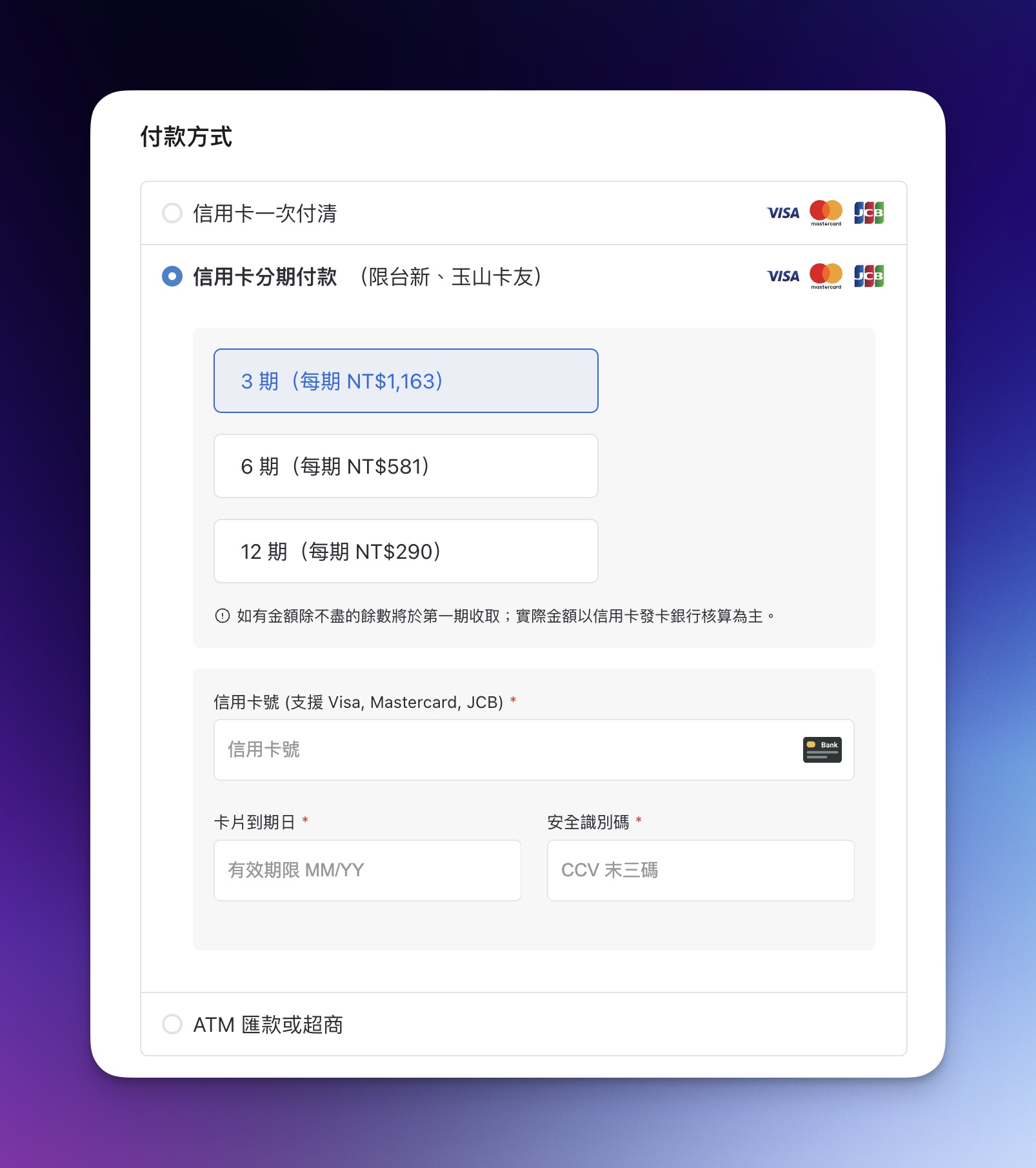
What have we done?

  • Redirect-free credit card checkout process
  • More intuitive installment payment options

Teachify's redesigned payment options interface

Redirect-free credit card checkout process

Traditional checkout processes typically require redirecting to a third-party payment processor’s checkout page, which can have several drawbacks:

  • Third-party payment processor checkout pages usually cannot be customized for brand identity or design, resulting in limitations in visuals, layout, and user flow;
  • Each additional redirect increases the chance that potential customers might abandon their purchase due to the complicated process;
  • Third-party payment processor checkout pages may contain extra information that could distract customers and reduce their purchase intent.

With technological advancements and improved online transaction security, we’re gradually implementing redirect-free checkout processes to make every transaction more seamless.

More intuitive installment payment options

We’ve noticed that as business needs continue to grow, many entrepreneurs want to offer installment payment options to help close higher-value orders more easily. That’s why we’ve been investing more and more in installment payment capabilities.

In this update, we’ve not only made installment payment options more clearly visible in the checkout process, but we’ve also displayed the “amount due per installment” directly in the checkout flow. Isn’t that more intuitive?

By the way, we’ll soon be introducing even more installment payment options (we’ve been offering “zero-card installments” to business users for three years already, and we plan to make this available to more users soon!)

I don’t see the new checkout screen on my website yet?

For this update, we’re rolling out changes gradually in phases to all users, so some users may not see the new checkout screen yet.

If you don’t see the new checkout screen on your website yet, don’t worry - we’ll be gradually enabling it for all users, so please be patient.

Is the new checkout process secure?

Teachify uses well-known payment processors both domestically and internationally, such as Stripe, PayPal, NewebPay, and PAYUNi. These companies all have strict information security measures to ensure consumer data safety.

During the actual transaction process, neither Teachify nor your website ever handles the complete credit card information. All information is transmitted directly to the payment processor. In other words, Teachify’s system itself, or your website, doesn’t carry the risk of “card number theft” because the card numbers entered by consumers are sent directly to the payment processor. The payment processor then returns the transaction authorization status, allowing us to complete the transaction, making it very secure.

Webhooks feature officially launched

new-features
Webhooks feature officially launched

What are Webhooks?

Webhooks are an API mechanism that allows you to automatically trigger actions in other systems when specific events occur.

For example, when a student purchases a course, you can trigger actions in other systems, such as sending notifications or updating data in other systems.

How to use Webhooks?

  1. Enable the Webhooks feature in the third-party integration application.
  2. Configure the Webhook URL and events.
  3. Test if the Webhooks are working properly.

Currently supported events

  • course.student_enroll
  • course.created
  • course.updated
  • membership_plan.created
  • membership_plan.updated
  • digital_download.created
  • digital_download.updated
  • event.created
  • event.updated
  • post.created
  • post.updated
  • payment.paid
  • payment.refund
  • user.created
  • user.updated

New navigation menu interface officially launched

improvements
New navigation menu interface officially launched

New navigation menu interface officially launched

To enhance user experience and support upcoming new features, we’ve launched a brand new navigation menu interface.

Now, whether you’re on mobile, tablet, or desktop, you can more easily browse through all of Teachify’s features.